
Guides/Advertising
How to Run ChatGPT (OpenAI) Ads in Modus
ChatGPT Ads is the newest ad platform Modus supports, and it follows the same pattern as Meta: Modus can publish real campaigns (created paused) and read the cost-per-customer numbers OpenAI's own reporting can't give you.
Before you start
- An OpenAI Ads API key for the ad account, or the optional partner OAuth connection — pasted or connected under Settings → ChatGPT Ads.
- 01
Connect your OpenAI Ads account
Paste your per-ad-account OpenAI Ads API key (or connect via OAuth) under Settings → ChatGPT Ads. Reporting is read-only against this key; publishing uses a separate write path that always creates campaigns paused, exactly like Meta.
- 02
Pick a campaign mode and create it
Click New campaign and choose one of three modes: Landing page (a chat-card ad pointing at your site), Product feed (ads generated from a product catalog you sync), or Business agent (a published agent with its own lead form). Each walks its own campaign → ad group → ad wizard.
- 03
Wire up the lead-sync webhook
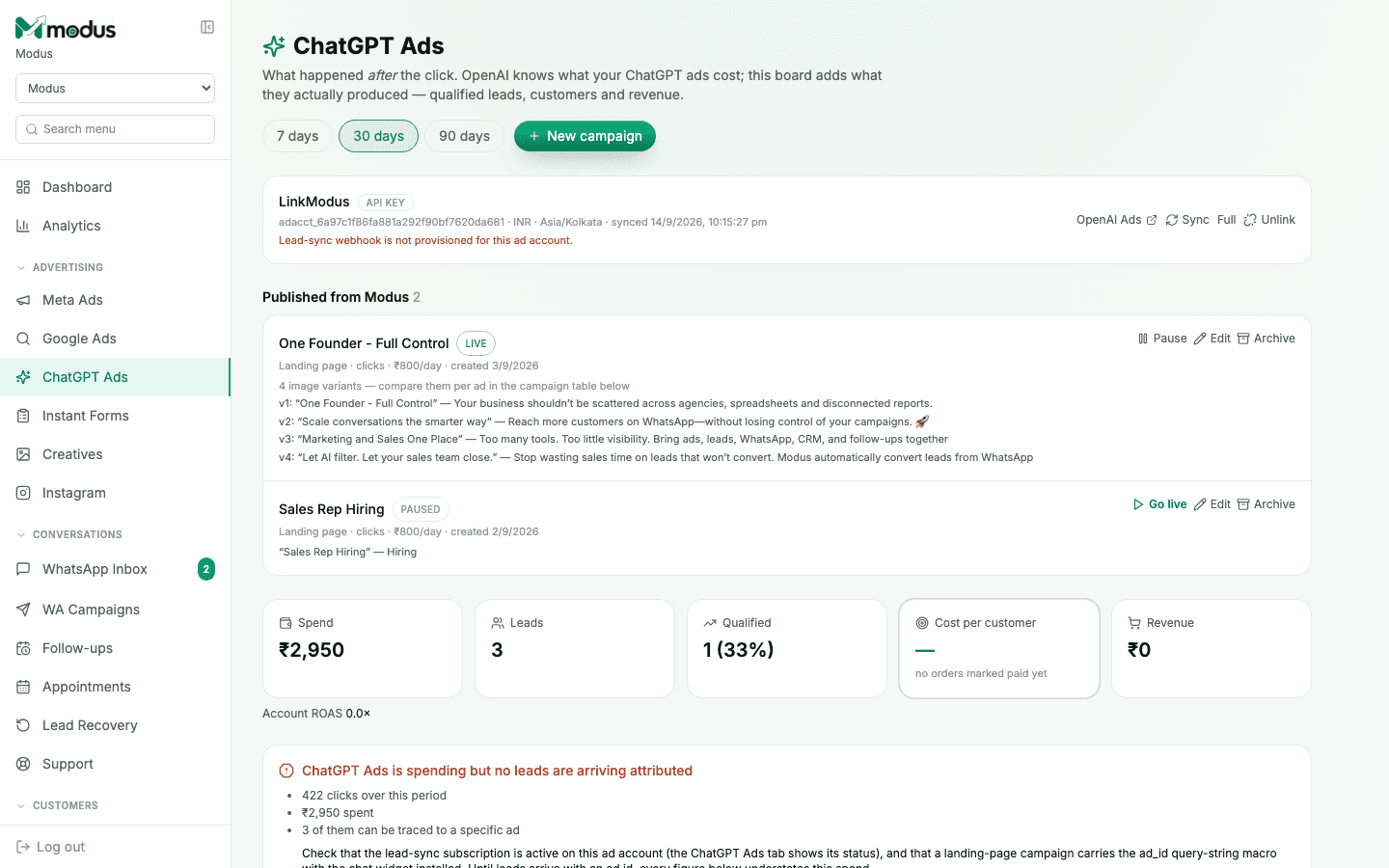
Leads and attribution both depend on the signed lead-sync webhook being provisioned for the ad account — the board flags it in red ("Lead-sync webhook is not provisioned") when it isn't. Landing-page campaigns also need the
ad_idmacro installed on the destination page, the same mechanism website chat attribution uses. - 04
Go live, then read the results
A paused campaign shows Go live in its row; a live one shows Pause. The tiles below — Spend, Leads, Qualified, Cost per customer, Revenue — work exactly like the Meta Ads board, and a red banner explains itself when spend is arriving but leads aren't yet attributed.
Good to know
Compare up to four image variants against each other per ad, right on the campaign row — no need to leave the board to see which creative is pulling its weight.
A Business Agent campaign's lead form feeds the same lead-sync webhook as the other two modes, so attribution works the same way regardless of which mode you chose.
Questions we get asked
Is publishing to ChatGPT Ads paused by default, like Meta?
Yes — every campaign, ad group and ad Modus creates is PAUSED. Only an explicit "Go live" on a specific campaign sets it active.
What's the difference between the three campaign modes?
Landing page sends clicks to your own site; Product feed generates ads from a synced catalog; Business agent runs a published conversational agent with its own lead form. Pick based on where you want the conversation to happen.
Why are clicks arriving but no leads showing up attributed?
Almost always the lead-sync webhook isn't provisioned for that ad account yet, or a landing-page campaign's destination is missing the ad_id macro. The board's own red banner walks through exactly this checklist.
See this running on your own numbers.
Every guide on this site is the real product — set up your own agent, ad account and WhatsApp number, and every deal it closes traces back to what produced it.