
Guides/Advertising
How to Capture Meta Instant Form Leads in Modus
A Meta lead ad opens a form right inside Facebook or Instagram, with the person's name and phone already filled in — no landing page, no typing. Every lead it produces lands straight in your CRM, tagged with the exact ad that paid for it.
Before you start
- A Facebook Page connected under Settings → Instant Forms — the owner does this themselves since it needs their Meta login; there is no admin path.
- 01
Check your connection status
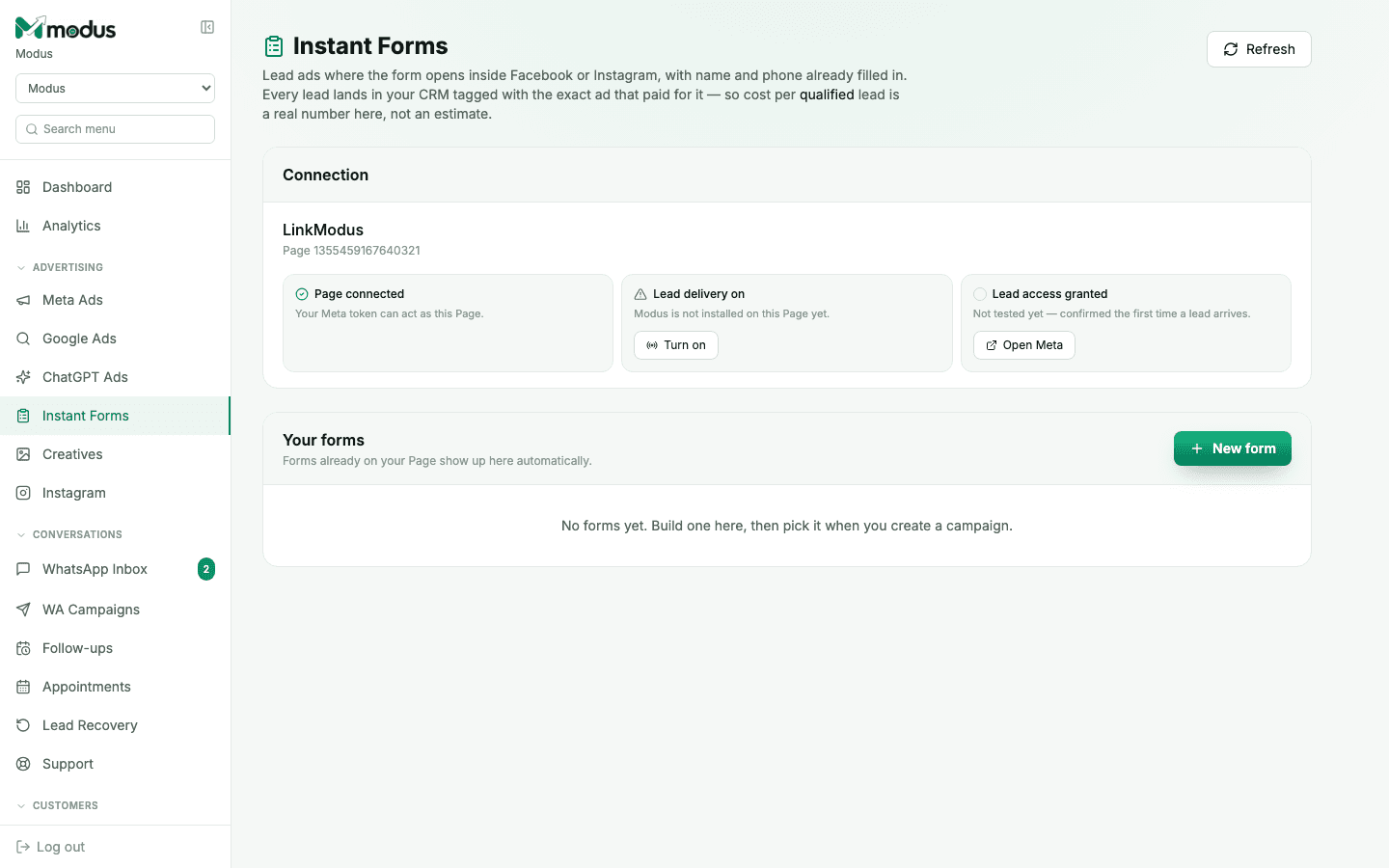
Open Instant Forms and read the three status chips: Page connected (your Meta token can act as this Page), Lead delivery on (Modus is installed to receive leads from it), and Lead access granted (whether a real lead read has actually worked — this one only tests true the first time a lead arrives, and shows as pending, not failed, until then).
- 02
Turn lead delivery on
If Lead delivery shows off, click Turn on — this subscribes Modus's webhook to this specific Page so new leads are pushed the moment someone submits the form.
- 03
Build or duplicate a form
Click New form to build one, or duplicate an approved one — Meta doesn't allow editing a form's questions once it has taken a lead, so a change means creating a new form, not editing the old one.
- 04
Pick the form when you launch a Meta ad campaign
Once a form exists, select it while creating a Meta Ads campaign to run it as a lead ad. Every submission is captured through the same ingest path whether it arrives via webhook or the periodic backfill sweep, so nothing is lost even if a webhook delivery is briefly missed.
Good to know
Lead Access Manager (a Meta setting) is a manual, one-time human step with no API — if it was never completed, "Lead access granted" will sit at pending indefinitely, not because anything is broken.
Meta only retains an unfetched lead for 90 days — Modus's backfill sweep exists specifically to catch anything a webhook delivery missed inside that window.
Questions we get asked
Can I edit a lead form after it's published?
No — Meta doesn't support editing a live form's questions. Duplicate it instead, tweak the copy, and use the new version going forward.
What if my lead access shows "pending" for weeks?
It only flips once a real lead has been successfully read — if your ad hasn't produced a lead yet, or the one-time Lead Access Manager grant on Meta's side was never completed, it stays pending. It doesn't mean anything is misconfigured.
Does an Instant Form lead show which ad it came from?
Yes — the same attribution engine that ties Meta ad spend to orders tags every Instant Form lead with the ad that produced it.
See this running on your own numbers.
Every guide on this site is the real product — set up your own agent, ad account and WhatsApp number, and every deal it closes traces back to what produced it.