
Guides/Setup
How to Build Your Knowledge Base (Knowledge DB) in Modus
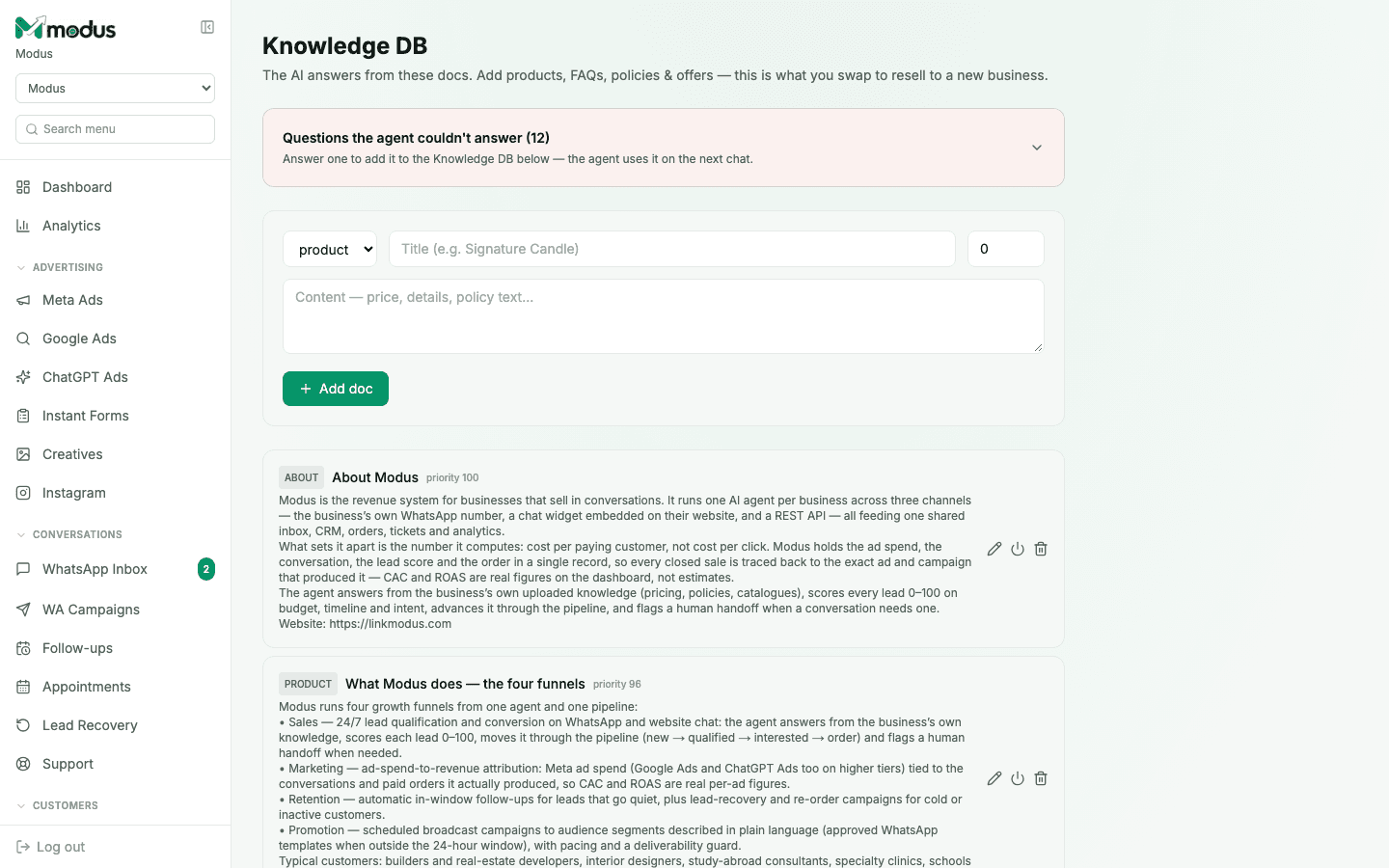
The Knowledge DB is what the AI actually answers from — not general knowledge, not a guess. Every active doc is a candidate to be read into the agent's prompt on every reply, which is exactly why what you add here (and what you leave out) matters more than any playbook instruction.
- 01
Add your first docs
Pick a type —
product,faq,policy,offer,aboutorbundle— give it a title and write the content: price, details, policy text, whatever a customer might ask about. Click Add doc. - 02
Set priority on what matters most
Each doc carries a priority number — a higher one (like the seeded "About" doc at priority 100) is weighted to be included first when there's more relevant knowledge than fits in one prompt. Reserve high priority for the facts that should never get crowded out.
- 03
Use an "offer" doc for time-bound promotions
Choosing type
offerunlocks extra fields — a short headline, an optional banner image, and run dates. The headline goes into the agent's opening message verbatim, so keep it to one line; the full terms still live in the doc's content. - 04
Answer the questions the agent couldn't
The banner at the top — Questions the agent couldn't answer — is a live queue of real customer questions that fell outside what you'd already added. Answer one and it becomes a new Knowledge DB doc immediately; the agent uses it on the very next chat, with no separate publish step.
- 05
Edit, deactivate or delete a doc
The pencil, power and trash icons on each doc let you edit its content, switch it off without deleting it (useful for a seasonal offer you'll reuse), or remove it outright.
Good to know
A gap is only flagged when the agent's own reply shows it genuinely didn't know the answer — a customer asking something correctly out of scope doesn't count, since that's the guardrail working, not a hole in your knowledge.
Ten different phrasings of the same question ("do you ship to Chennai?", "can I get this delivered to Chennai?") collapse into one flagged gap with a rising asked-count, not ten separate rows to review.
Keep pricing and policy details out of your AI Assistant playbook and in here instead — the playbook decides what the agent is trying to do; a price list belongs in a doc so it's retrieved when relevant, not recited on every single reply.
Questions we get asked
What does "the AI answers strictly from this" actually mean?
It means product facts, prices and policies come only from what you've added here — not from the model's general knowledge. If it's not in a doc (or the playbook), the agent won't assert it as fact.
Is there a limit on how many documents I can add?
Yes, a per-tenant ceiling exists so prompt cost stays predictable as your catalogue grows — well beyond what a typical business needs, and large catalogues are served through ranked retrieval rather than dumping every doc into every reply.
Can I paste a huge product catalogue in as one doc?
You can, but many smaller, well-titled docs retrieve better than one giant one — retrieval ranks by relevance to the question, and a focused doc on one product matches a specific question more precisely than a catalogue-sized wall of text.
See this running on your own numbers.
Every guide on this site is the real product — set up your own agent, ad account and WhatsApp number, and every deal it closes traces back to what produced it.