
Guides/Setup
How to Use the Guided Meta Setup Wizard in Modus
Pasting a Meta system-user token on the plain Settings page (see the Meta Ads & WhatsApp setup guide) is the fastest path if you've done Meta developer setup before. The guided wizard is the other path — the same end result, but it walks you through every Meta screen with a direct link and checks off each step as it detects it's done.
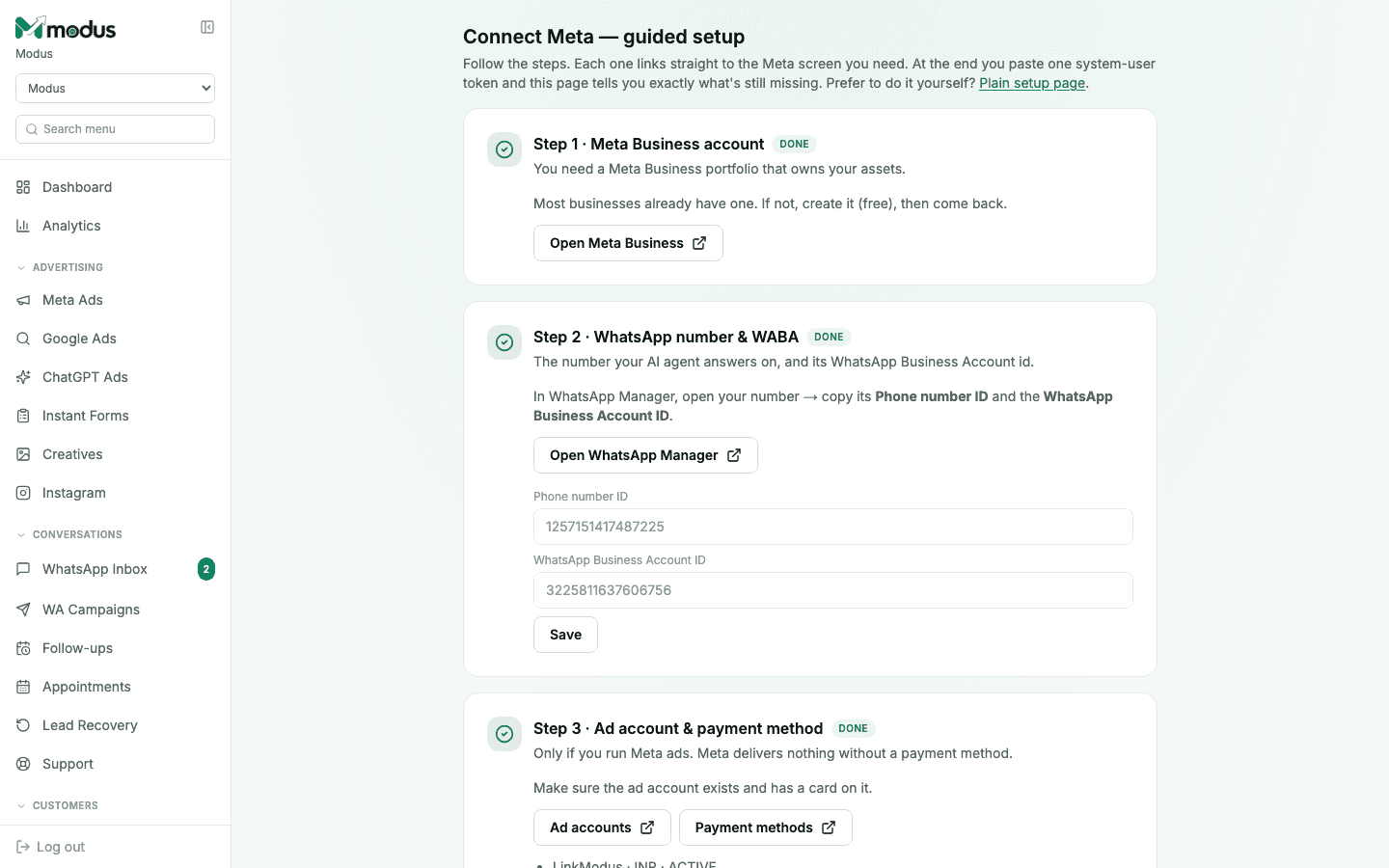
- 01
Open the guided wizard
From Meta setup, click Connect Meta — guided setup, or use the "Shortcut: Connect with Facebook" link. Each step here links straight to the exact Meta screen you need; a Plain setup page link is always available if you'd rather paste a token directly.
- 02
Confirm your Meta Business account
Step 1 just needs a Meta Business portfolio that owns your assets — most businesses already have one. If not, Open Meta Business creates one for free, then come back.
- 03
Add your WhatsApp number and WABA ID
Step 2 opens WhatsApp Manager directly. Copy your number's Phone number ID and WhatsApp Business Account ID from there and paste them in — this is the number your AI agent will answer on.
- 04
Confirm an ad account and payment method (only if you run Meta ads)
Step 3 checks that an ad account exists with a payment method on it — Meta delivers nothing without one. Skip this step entirely if you're only using WhatsApp, not running ads.
- 05
Choose what to enable
Step 4 is a feature picker — tick what this business will actually use. What you tick decides exactly which permissions the system-user token needs; nothing is requested that you didn't select.
- 06
Generate and paste the token
Steps 5 and 6 generate a system-user token scoped to exactly what you ticked, then verify it against Meta and show you what — if anything — is still missing before saving.
- 07
Finish any conditional steps
If you ticked Instant Form leads or Instagram/Facebook posting, two more steps appear: Lead Access Manager (a one-time grant on Meta's side with no API, so it can't be automated) and connecting the specific Instagram & Facebook Page the token should post as.
Good to know
The wizard and the plain settings page write to the exact same place — starting in the wizard and finishing on the plain page (or vice versa) works fine; neither is "more correct" than the other.
Every step shows a live DONE badge the moment Modus detects it's actually satisfied — you're never guessing whether a step you did on Meta's side has registered.
Questions we get asked
Do I have to use the guided wizard?
No — it's a shortcut for people who'd rather be walked through each Meta screen. Pasting a system-user token directly on the plain settings page does the same thing.
What is Lead Access Manager, and why can't the wizard finish it for me?
It's a manual grant on Meta's side with no API to automate — Meta requires a human to complete it once per Page. The wizard tells you it's needed and links you there, but can't click through it on your behalf.
What happens if I tick a feature I don't end up using?
Nothing breaks — it just means the token was generated with a permission it doesn't need. You can regenerate a narrower token later from the same wizard if you want to tidy it up.
See this running on your own numbers.
Every guide on this site is the real product — set up your own agent, ad account and WhatsApp number, and every deal it closes traces back to what produced it.